
TL;DR

Prime made for students and young adults
- Fast, free delivery for dorm and study essentials
- Prime Video and Amazon Music included
- Member-only deals
The most effective way to reduce noise from high-power rigs isn’t just soundproofing; it’s moving the rig away and ensuring proper ventilation. A closet setup, with the right airflow, offers a quiet, space-efficient solution that keeps your equipment cool without noise pollution.
Ever notice how loud those high-end AI workstations can get? The fan noise, the hum of GPUs, the whoosh of airflow—it’s enough to make you wish for a soundproof booth. But what if the best solution isn’t more foam or thicker walls? What if the secret lies in where—and how—you place your rig?
In this guide, you’ll learn why distance beats absorption every time and how a simple ‘rig in the closet’ can turn your noisy setup into a whisper-quiet powerhouse. Plus, we’ll cover the critical ventilation tricks to keep your equipment cool and happy, even in a tiny space.
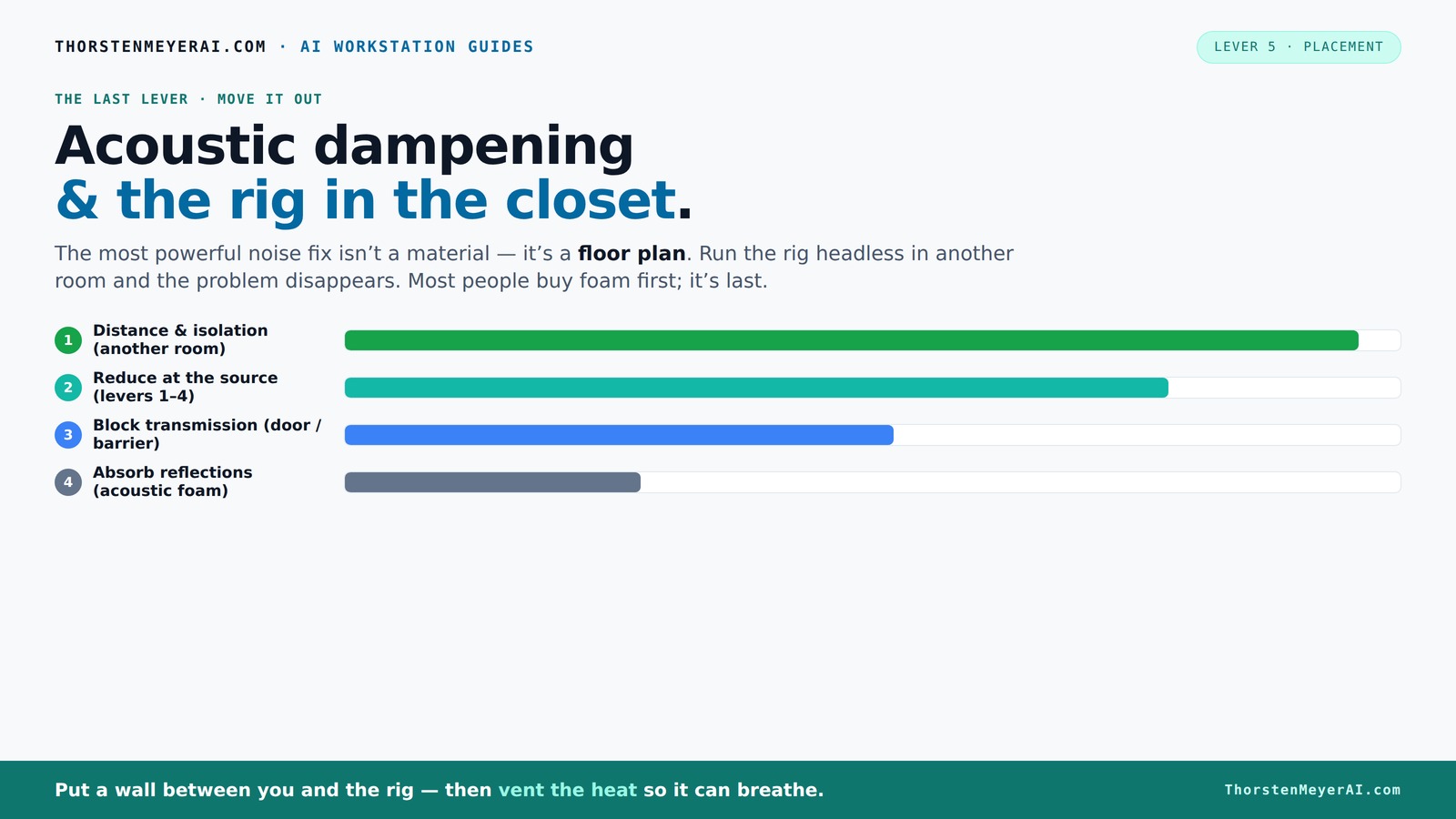
Acoustic dampening
& the rig in the closet.
The most powerful noise fix isn’t a material — it’s a floor plan. A rig you can’t hear because it’s in another room beats any amount of foam. Tap the approaches in Part 1 to see what actually works.
(another room)
(levers 1–4)
(door / barrier)
(acoustic foam)
Contain the noise, not the heat
Key Takeaways
- Distance is the most effective noise reduction—separating your rig from your workspace beats foam treatments by miles.
- A 'rig in the closet' can be quiet and cool if you incorporate proper ventilation and vibration isolation.
- Understand the difference between sound absorption and blocking to choose the right treatment for each noise type.
- Always prioritize airflow and temperature management when placing high-power hardware in enclosed spaces.
- Remote access is your best friend—manage a noisy rig from a quiet, distant location.
soundproofing acoustic panels for computer room
As an affiliate, we earn on qualifying purchases.
As an affiliate, we earn on qualifying purchases.
Why Moving Your Rig Is the Simplest, Most Effective Noise Fix
When it comes to noise, the biggest difference-maker is distance. If you can shove your AI rig into another room—say, a basement or a closet—the sound just doesn’t reach you. Imagine your GPU spinning at full tilt in a closet, while your workspace stays silent. That’s because sound waves weaken over distance, especially if you block their path.
Think of it like a loudspeaker in a stadium—standing far away makes it sound quieter. The same applies here. The real trick? Use a wired connection or fast Wi-Fi to access the rig remotely. This way, the noise and heat stay contained, and your workspace remains peaceful.
As an affiliate, we earn on qualifying purchases.
How 'Rig in the Closet' Setup Works — And Why Ventilation Is the Key
Placing your rig inside a closet or custom enclosure can be a game-changer for noise. It acts like a sound barrier, muffling the racket—think of a professional recording booth. But there’s a catch: heat. A sealed space traps warmth, turning your quiet closet into a sauna for your hardware.
To keep things cool, you need to let air flow. This means adding vents, exhaust fans, or even ducted cooling. For example, a small quiet fan pulling hot air out while cool air enters through passive vents can keep temperatures stable. Without proper airflow, your GPU could throttle or overheat, defeating the purpose.
For a detailed setup, consider a purpose-built soundproof cabinet with integrated fans and thermostats. Want to learn more? Check out this comprehensive guide on reducing heat and noise in your AI workstation.
ventilation fan for high-performance PC
As an affiliate, we earn on qualifying purchases.
As an affiliate, we earn on qualifying purchases.
The Difference Between Sound Absorption and Blocking — What You Need to Know
Acoustic dampening isn’t just about sticking foam on the wall. There are two types of noise to combat: airborne and structure-borne. Airborne noise—like the hum of fans—travels through the air, and foam panels absorb it, softening echoes inside the room. But they don’t stop it from leaking out.
Structure-borne noise—vibrations through floors and walls—is a different beast. It travels through the solid structure. To tackle this, you need rubber feet, anti-vibration pads, or decoupling mounts that isolate your rig from the surface it sits on. This prevents low-frequency hums from transmitting into the floor or desk, which foam can’t do.
Here’s a quick comparison:
| Type of Noise | Best Fix |
|---|---|
| Airborne noise (fans, hum) | Acoustic foam, barriers, soundproof panels |
| Structure-borne noise (vibrations, low-frequency hum) | Anti-vibration mounts, rubber feet, decoupling pads |
As an affiliate, we earn on qualifying purchases.
Practical Steps to Soundproof and Cool Your Closet Rig
- Choose the right enclosure: Use a purpose-built soundproof cabinet with sound-absorbing lining and ducted airflow.
- Install proper ventilation: Add exhaust fans and passive vents to let heat escape—without creating noise leaks.
- Use anti-vibration solutions: Fit rubber grommets or pads between the rig and the enclosure to prevent vibrations from escaping.
- Monitor temperatures: Keep an eye on CPU/GPU temps with tools like HWMonitor or MSI Afterburner during initial tests.
- Optimize airflow: Position fans for front-to-back airflow, and consider ducting to direct hot air outside.
Want detailed guidance? Check out this step-by-step tutorial on reducing heat and noise.
Frequently Asked Questions
Can I put my GPU rig in a closet without overheating it?
Yes, but only if you provide proper ventilation. Use exhaust fans, passive vents, or ducted airflow to keep temperatures in check. Regularly monitor temperatures with tools like HWMonitor to prevent overheating.Is a closet setup suitable for all kinds of hardware?
It's ideal for many high-power rigs, but always consider the heat output and airflow needs. For extremely hot setups, specialized soundproof cabinets with integrated cooling are recommended.How do I prevent vibrations from transmitting through my closet walls?
Use anti-vibration pads, rubber feet, or decoupling mounts under your equipment. These simple solutions isolate vibrations and reduce low-frequency noise leaks.What’s better for noise reduction—foam panels or barriers?
Foam panels absorb airborne sound within a room but don’t block sound passing through walls. Barriers or soundproof doors are necessary if you want to contain noise externally.Are portable acoustic treatments effective?
Portable panels and modular enclosures can work well for temporary or flexible setups. They’re especially handy for small spaces or changing configurations, but always ensure proper ventilation.Conclusion
Moving your high-power AI rig into a closet or another room isn’t just about silence; it’s about smarter workflow and better hardware longevity. When combined with proper ventilation and vibration control, it becomes a simple, elegant solution to a noisy problem. Your workspace remains peaceful, and your hardware stays cool and happy.
Think twice before piling on more foam. Sometimes, the best fix is just a door and a fan. Quiet, cool, and out of sight—your new normal awaits.
Fall Picks
fall essentials
As an affiliate, we earn on qualifying purchases.