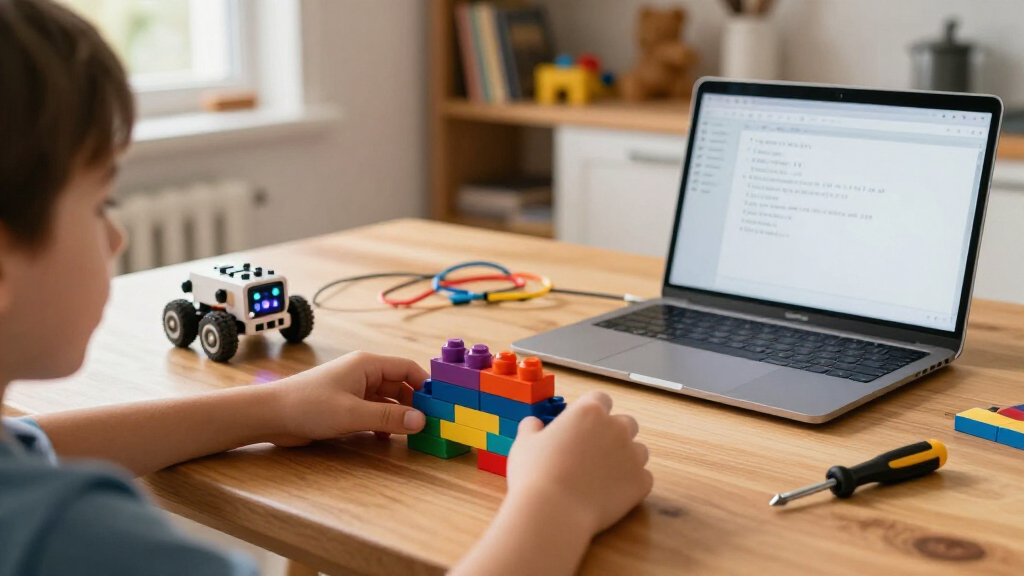

Coding robots for kids range from screen-free grid-based toys for five-year-olds to Arduino-powered build kits that teach real electronics, and the right pick depends far more on your child’s age and patience than on price. The Makeblock mBot earns my best-overall spot because it balances an approachable block-coding app with genuine room to grow into Arduino programming. For younger beginners, the Learning Resources Botley 2.0 Activity Set teaches sequencing entirely without a screen, while the ELEGOO UNO R3 Smart Robot Car Kit suits older kids ready for solder-free wiring and C-style code. The main tradeoff in this category is between instant playability and long-term depth: the simplest robots are mastered in a weekend, and the deepest kits can frustrate a child who just wants to drive something. Read on for the full breakdown of all fifteen options.

Prime made for students and young adults
- Fast, free delivery for dorm and study essentials
- Prime Video and Amazon Music included
- Member-only deals
Key Takeaways
- Screen-free robots (Botley, Code & Go Mouse) dominate the under-7 age group because they teach sequencing logic without requiring reading skills or a tablet.
- The Makeblock mBot lineup won best overall by bridging block coding and Arduino C++, making it the longest-lived purchase here — the same kit stays relevant from age 8 into early teens.
- Build-first kits (Sillbird 5-in-1, Apitor 6-in-1, Mech-5) trade instant gratification for engineering skills; assembly alone can take hours, which suits patient tinkerers but not impulse players.
- The ELEGOO UNO R3 car kit is the only true entry into real-world electronics, but its age floor of roughly 10-12 is real — younger kids will need a parent co-building.
- Compact robots like Sphero Mini and Ozobot Evo win on portability and classroom friendliness, but their small size means smaller batteries and shorter sessions.
| Sillbird 5-in-1 Programmable Robot Building Kit with App and Remote Control |  | Best Build-and-Rebuild Pick | Brand: Sillbird | Pieces: 488 | Builds: Robot, car, tank, dinosaur, or custom model | VIEW LATEST PRICE | See Our Full Breakdown |
| Learning Resources Code & Go Robot Mouse |  | Best Screen-Free Starter for Preschoolers | Recommended age: 4+ years | Included items: Robot mouse, 30 double-sided coding cards, activity guide | Controls: Push-button programming | VIEW LATEST PRICE | See Our Full Breakdown |
| Teach Tech Mech-5 STEM Coding Robot Building Kit |  | Best for Mechanical Engineering Minded Kids | Brand: Teach Tech | Age range: 10+ | Programming method: Coding buttons on a mechanical wheel | VIEW LATEST PRICE | See Our Full Breakdown |
| Makeblock mBot Coding Robot Kit |  | Best Path to Real Programming | Brand: Makeblock | Model: 90053 | Age range: 8 years and up | VIEW LATEST PRICE | See Our Full Breakdown |
| ELEGOO UNO R3 Smart Robot Car Kit V4 with Camera |  | Best Premium Pick for Teens | Brand: ELEGOO | Model: US-EL-KIT-012 | Controller: UNO R3 | VIEW LATEST PRICE | See Our Full Breakdown |
| Wonder Workshop Dash Coding Robot for Kids Ages 6+ |  | Best App-Based Pick | Brand: Wonder Workshop | Recommended age: 6 years and up | Battery life: Up to 5 hours of active play | VIEW LATEST PRICE | See Our Full Breakdown |
| Learning Resources Code & Go Robot Mouse Activity Set |  | Best for Preschoolers | Recommended age: 4 years and up | Maze board size: 20 x 20 inches | Included components: Colby robot mouse, 16 maze grids, 22 maze walls, 3 tunnels, 30 double-sided coding cards, 10 double-sided activity cards, cheese wedge, Activity Guide | VIEW LATEST PRICE | See Our Full Breakdown |
| Learning Resources Botley 2.0 Coding Robot Activity Set |  | Best Screen-Free Kit | Pieces: 78 | Included items: Coding robot, remote programmer, 40 coding cards, 6 double-sided boards, stackable obstacle pieces | Turn angle: 45° | VIEW LATEST PRICE | See Our Full Breakdown |
| Ozobot Evo Coding Robot Kit – Ages 5-11 – STEM Coding for Kids & Teachers |  | Best for Classrooms | Age range: 5-11 years | Included robot: 1 Ozobot Evo robot | Color code markers: 5 dual-tip markers | VIEW LATEST PRICE | See Our Full Breakdown |
| Learning Resources Botley the Coding Robot |  | Best Value Screen-Free Pick | Recommended age: 5 years and up | Programming capacity: Up to 80 steps | Included items: Botley robot, remote programmer, detachable arms, 40 coding cards, tiles, obstacles | VIEW LATEST PRICE | See Our Full Breakdown |
| Apitor 6-in-1 STEM Coding Robot Building Kit, 480 Pieces |  | Best Building Variety | Models: 6 | Building pieces: 480 colorful blocks | Control module: 1, with 2 high-speed motors | VIEW LATEST PRICE | See Our Full Breakdown |
| Sphero Mini Green Coding Robot Ball |  | Best Compact Pick | Color: Green | Size: About the size of a ping-pong ball | Sensors: Gyroscope and accelerometer | VIEW LATEST PRICE | See Our Full Breakdown |
| Learning Resources Botley Coding Robot Activity Set, 77 Pieces | 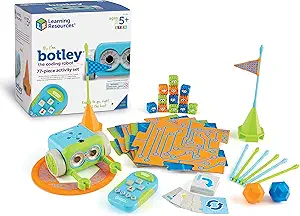 | Best Screen-Free Learning | Age range: 5 years and up | Piece count: 77 | Power: 5 AAA batteries required (not included) | VIEW LATEST PRICE | See Our Full Breakdown |
| Thames & Kosmos My Robotic Pet: Coding Chameleon STEM Kit |  | Best Screen-Free Build | Length: 15 inches | Recommended age: 8+ with adult help; 12+ for independent play | Play modes: Coding Mode, Wild Mode, Pet Mode | VIEW LATEST PRICE | See Our Full Breakdown |
| Makeblock mBot Arduino Robot Kit for Kids Ages 8–12 |  | Best Coding Progression | Recommended age: 8–12 years | Projects: 4 guided projects | Assembly time: About 15 minutes | VIEW LATEST PRICE | See Our Full Breakdown |
| coding robots for kid | Recommended age |
|---|---|
| Sillbird 5-in-1 Programmable R | 6 years and up |
| Learning Resources Code & Go R | 4+ years |
| Teach Tech Mech-5 STEM Coding | — |
| Makeblock mBot Coding Robot Ki | — |
| ELEGOO UNO R3 Smart Robot Car | 12 years and up |
| Wonder Workshop Dash Coding Ro | 6 years and up |
| Learning Resources Code & Go R | 4 years and up |
| Learning Resources Botley 2.0 | — |
| Ozobot Evo Coding Robot Kit | — |
| Learning Resources Botley the | 5 years and up |
| Apitor 6-in-1 STEM Coding Robo | 7–12 |
| Sphero Mini Green Coding Robot | — |
| Learning Resources Botley Codi | — |
| Thames & Kosmos My Robotic Pet | 8+ with adult help; 12+ for independent play |
| Makeblock mBot Arduino Robot K | 8–12 years |
More Details on Our Top Picks
Sillbird 5-in-1 Programmable Robot Building Kit with App and Remote Control
This kit earns its spot by refusing to be a one-build wonder. With 488 pieces and five official models plus open-ended custom creations, it keeps kids coming back long after the first robot is finished — something single-config robots like the Wonder Workshop Dash simply can’t match. The Bluetooth app and remote control combo means siblings with different skill levels can both play: one driving, one exploring the basic programming modes.
The tradeoff is realistic, though. Assembly takes real time and patience, so six-year-olds will need an adult nearby. And 40 minutes of play per charge cuts sessions short on ambitious days. Compared with the Teach Tech Mech-5, it trades mechanical depth for variety and app-based interactivity — a fair swap for younger builders.
Pros:- Five different builds plus custom creations from one 488-piece kit
- Dual control options: Bluetooth app and physical remote
- Introduces basic programming alongside hands-on STEM building
- Rechargeable battery avoids ongoing battery costs
Cons:- Assembly demands significant time and patience from younger kids
- Play time caps at roughly 40 minutes per charge
- Programming features are basic compared with dedicated coding robots
Best for: Kids ages 6-10 who love rebuilding toys and want variety without deep programming complexity
Not ideal for: Families seeking a ready-to-play robot out of the box — the multi-step assembly will frustrate impatient kids
- Brand:Sillbird
- Pieces:488
- Builds:Robot, car, tank, dinosaur, or custom model
- Controls:Bluetooth app and remote control
- Battery:Rechargeable
- Play time:Up to 40 minutes
- Recommended age:6 years and up
Our verdict“A strong choice for kids who tire of single-purpose toys and want a building kit they can reinvent for months.”
Learning Resources Code & Go Robot Mouse
For the youngest coders in this lineup, this button-programmed mouse gets sequencing concepts across without a tablet in sight. Kids lay out the 30 double-sided coding cards to plan a route, then push directional buttons and watch the mouse execute — lights and sounds giving instant feedback on whether their plan worked. At ages 4 and up, it sits below the entry point of the Sphero Mini or Makeblock mBot, both of which assume more patience and screen fluency.
It’s deliberately simple, and that’s both the appeal and the ceiling. There’s no app layer to grow into, and the maze-grid expansion set that makes challenges richer is sold separately. Batteries are also missing from the box. But as a first taste of logic, it’s hard to beat the friction-free design.
Pros:- Completely screen-free introduction to sequencing and logic
- Coding cards and activity guide provide structured, parent-friendly challenges
- Lights, sounds, and two speeds give immediate feedback that keeps young kids engaged
Cons:- Batteries not included
- The expanded activity set with maze grid is a separate purchase
- Limited depth once basic routes are mastered
Best for: Parents of preschoolers (ages 4-6) who want a first coding toy with zero screen time
Not ideal for: Kids 7 and up who already understand sequencing — they’ll outgrow it within weeks
- Recommended age:4+ years
- Included items:Robot mouse, 30 double-sided coding cards, activity guide
- Controls:Push-button programming
- Speeds:2
- Features:Lights and sounds
- Power:3 AAA batteries (not included)
- Screen-free:Yes
Our verdict“The right first coding robot if your child is pre-reading and you want learning without a screen.”
Teach Tech Mech-5 STEM Coding Robot Building Kit
The Mech-5 stands apart in this roundup for how it programs: a physical coding wheel with mechanical buttons instead of an app or screen. Kids snap coding buttons onto the wheel, and the robot executes those commands to move, rotate 360 degrees, throw, lift, kick, and even draw. That tangible approach makes programming logic visible in a way the Sillbird 5-in-1 — with its app-based controls — never quite achieves, and it runs with zero batteries, a genuine rarity here.
The honest catch: assembly takes multiple hours, and the payoff is one build, not five. Kids who love taking apart machines will thrive; kids who want to drive something within minutes of unboxing should look at the Makeblock mBot instead, which assembles in about 15 minutes.
Pros:- Mechanical coding wheel makes programming logic physical and visible
- Wide action range including throwing, lifting, kicking, and drawing
- Battery-free operation means no ongoing power costs or charging waits
Cons:- Multi-hour build time before the robot does anything
- Single model — no rebuild variety like multi-config kits
Best for: Kids 10 and up who enjoy long building projects and want to understand mechanics, not just code
Not ideal for: Impatient builders or younger kids — the multi-hour assembly before any play is a real barrier
- Brand:Teach Tech
- Age range:10+
- Programming method:Coding buttons on a mechanical wheel
- Robot actions:Move, rotate 360 degrees, throw, lift, kick, and draw
- Assembly:Unassembled kit with step-by-step instructions
- Build time:Multiple hours
- Batteries required:No
Our verdict“A great fit for a ten-and-up tinkerer who treats the build itself as the main event.”
Makeblock mBot Coding Robot Kit
This pick makes the most sense for the kid ready to move beyond toys and toward actual programming platforms. The mBot supports both Scratch and Arduino, meaning an eight-year-old can start with drag-and-drop blocks and later graduate to written code on the same hardware. Assembly takes about 15 minutes — a striking contrast to the multi-hour Teach Tech Mech-5 build — so play starts fast. Line-following and obstacle avoidance give it behaviors that feel autonomous rather than remote-controlled.
Two things hold it back from a clean sweep. The add-on ecosystem is where the real depth lives, and tapping into the 100+ compatible modules means extra spending down the road. And you’ll need to supply four AA batteries plus a CR2025 before anything powers on — a small annoyance the ELEGOO robot car avoids with its included rechargeable pack.
Pros:- Supports both Scratch block coding and Arduino text programming on one platform
- Assembles in roughly 15 minutes for near-instant play
- Line-following, obstacle avoidance, and remote control feel genuinely autonomous
- Large ecosystem of 100+ modules and 500+ parts for expansion
Cons:- Required AA and CR2025 batteries not included
- Meaningful progression depends on buying add-on modules
Best for: Kids 8-12 who are ready for Scratch or Arduino coding and have a parent willing to support the journey
Not ideal for: Families wanting everything in the box — batteries aren’t included and deeper projects require add-on purchases
- Brand:Makeblock
- Model:90053
- Age range:8 years and up
- Assembly time:About 15 minutes
- Programming platforms:Scratch and Arduino
- Features:Line-following, obstacle avoidance, remote control
- Compatibility:100+ electronic modules and 500+ platform parts
- Robot batteries:4 AA batteries (not included)
Our verdict“The strongest option here for a kid whose next step is real code, not just remote-controlled play.”
ELEGOO UNO R3 Smart Robot Car Kit V4 with Camera
This is the ambitious end of the lineup, and it earns that position with hardware the others simply don’t have: an ESP32-based Wi-Fi camera module enabling FPV video, so your teen can drive the car from a first-person view through an app. Add line tracking, obstacle avoidance, and auto-follow modes, plus keyed connectors that reduce wiring mistakes, and it sits a clear step beyond the Makeblock mBot in raw capability — closer to a hobbyist Arduino project than a toy.
That ambition cuts both ways. The 12+ recommendation comes with a real caveat: first-time builders may need adult guidance, and the kit assumes willingness to work through Arduino IDE examples rather than follow pure plug-and-play. Compared with the mBot’s 15-minute assembly, this is a genuine project. But for a motivated teen eyeing robotics clubs or STEM coursework, that project is the point.
Pros:- Camera and Wi-Fi module deliver FPV video driving from an app
- Multiple interactive modes: line tracking, obstacle avoidance, and auto follow
- Keyed connectors and guided example programs ease the beginner learning curve
- Rechargeable 2000 mAh battery included
Cons:- First-time builders will likely need adult guidance
- Requires full assembly and Arduino programming before any driving fun
Best for: Teens 12 and up with some building experience and an interest in Arduino-level robotics
Not ideal for: Younger kids or hands-off gift-givers — the assembly and programming expect real adult-adjacent effort
- Brand:ELEGOO
- Model:US-EL-KIT-012
- Controller:UNO R3
- Camera and Wi-Fi module:ESP32-WROVER-based
- Battery:2000 mAh rechargeable lithium-ion
- Control methods:App and IR remote
- Features:FPV video, line tracking, obstacle avoidance, auto follow
- Recommended age:12 years and up
- Manufacturer warranty:Half year
Our verdict“The pick for a serious teen ready to build a real Arduino project — not for anyone wanting quick fun.”
Wonder Workshop Dash Coding Robot for Kids Ages 6+
Dash stands out for making app-driven coding feel playful rather than academic. Five compatible apps span a genuine skill ladder, from picture-based coding up to block programming, and the robot itself sings, dances, dodges obstacles, and responds to voice commands — a level of personality that screen-free options like Botley 2.0 simply can’t match. The 5-hour battery life also outlasts most competitors in this roundup.
The tradeoff is structural: Dash is useless without a tablet or phone, and it has no camera, so computer-vision projects are off the table. Compared with the Ozobot Evo, which works even when the internet doesn’t, Dash depends entirely on a compatible device being available and charged. Families trying to limit screen time should look elsewhere.
Pros:- Five apps create a genuine progression from beginner to block-based coding
- Sing, dance, obstacle-avoidance, and voice response keep kids engaged
- Up to 5 hours of active play per charge outlasts most rivals
- Building brick connectors extend play with existing construction toys
Cons:- Completely dependent on a compatible smart device for the apps
- No camera, limiting more advanced computer-vision projects
Best for: Families with a spare tablet who want a personality-rich robot that grows from beginner apps to real block coding
Not ideal for: Screen-time-conscious households or anyone without a compatible iOS, Android, or Fire OS device
- Brand:Wonder Workshop
- Recommended age:6 years and up
- Battery life:Up to 5 hours of active play
- Compatible platforms:Apple iOS, Android OS, Fire OS
- Included components:Dash robot, two building brick connectors, USB charging cable
- Camera:None
- Warranty:1 year against manufacturer defects
Our verdict“This pick makes the most sense for families who already own a tablet and want the most entertaining app-based coding companion for ages 6–11.”
Learning Resources Code & Go Robot Mouse Activity Set
At ages 4 and up, this is the youngest entry point in the entire roundup, and the maze-based format is what makes it work: kids physically build a 20 x 20 inch board, lay out coding cards to plan a route, then press buttons on Colby the mouse to execute it. That plan-then-run structure teaches sequencing more concretely than app-based options like Dash, where the screen does some of the thinking for you.
The limitations are real, though. Compared with Botley 2.0, which handles loops and object sensing, the mouse is a single-purpose racer with simpler logic. And the 3 AAA batteries aren’t in the box, so it’s not ready to go on gifting day without a shopping trip. Kids beyond kindergarten will likely outgrow it within a year or two.
Pros:- Lowest starting age of any option here, at 4 years old
- Physical maze building makes coding logic tangible and screen-free
- 30 coding cards and 10 activity cards support repeatable structured lessons
- Two speeds and lights/sounds keep young kids entertained
Cons:- Requires 3 AAA batteries that are not included
- Logic depth is shallow — no loops, sensors, or advanced concepts
Best for: Parents and preschool teachers introducing coding logic to 4- and 5-year-olds with zero screen exposure
Not ideal for: Kids 7 and up, who will find the button-programming and maze format too simple compared with Botley or Ozobot Evo
- Recommended age:4 years and up
- Maze board size:20 x 20 inches
- Included components:Colby robot mouse, 16 maze grids, 22 maze walls, 3 tunnels, 30 double-sided coding cards, 10 double-sided activity cards, cheese wedge, Activity Guide
- Robot features:Lights, sounds, two speeds
- Battery requirement:3 AAA batteries (not included)
- Play style:Screen-free
Our verdict“This set is best suited to preschool and kindergarten classrooms where screen-free sequencing practice is the goal, not long-term skill growth.”
Learning Resources Botley 2.0 Coding Robot Activity Set
Botley 2.0 is the most complete screen-free package in this lineup: 78 pieces include boards, obstacles, 40 coding cards, and a remote programmer, and the robot itself supports 45-degree turns, object sensing, and 16 secret code tricks. Where the Code & Go Mouse tops out at simple sequences, Botley 2.0 pushes into multi-step paths and conditional-style thinking — meaningful headroom for a no-screen toy.
Two caveats temper the recommendation. Every activity requires physically arranging cards, boards, and obstacles, so setup time can exceed play time on busy evenings — app options like Dash start instantly. And despite the progression, it’s still aimed at young learners; a 9- or 10-year-old ready for the Ozobot Evo’s Blockly programming will find Botley’s ceiling quickly.
Pros:- 78 pieces let kids build custom mazes and obstacle challenges endlessly
- Object sensing and 45-degree turns enable genuinely multi-step programming
- No app, device, or internet required at any point
- 16 secret code combinations add discovery-style replay value
Cons:- Requires arranging physical cards and pieces before each coding session
- Challenge ceiling is low for kids beyond early elementary age
Best for: Families committed to screen-free learning who want the deepest no-device coding experience for ages 5–8
Not ideal for: Older or advanced kids who need real programming challenges, and parents who want zero-setup entertainment
- Pieces:78
- Included items:Coding robot, remote programmer, 40 coding cards, 6 double-sided boards, stackable obstacle pieces
- Turn angle:45°
- Secret code combinations:16
- App or device required:No
- Play style:Screen-free with remote programmer
Our verdict“Botley 2.0 is the clear choice for screen-free households that want depth beyond the Robot Mouse, provided the child is still in the 5–8 range.”
Ozobot Evo Coding Robot Kit – Ages 5-11 – STEM Coding for Kids & Teachers
No other option here straddles screen-free and digital coding as gracefully as the Evo. Younger kids draw color codes with the included dual-tip markers and the robot responds; older ones move into online Blockly programming across five skill levels from beginner to master. That dual-path design is why it beats single-mode rivals — the Code & Go Mouse can’t scale up, and Dash can’t scale down to marker-based play.
The access to 700+ free STEAM lessons and a hard-shell zip case makes this the strongest classroom pick, but it comes with dependencies the physical robots avoid: the Blockly portion needs internet, and the markers wear out with heavy classroom use and need replacing. Home users who never touch the lesson library are paying for classroom-grade infrastructure they won’t use.
Pros:- Dual coding modes — marker-based and Blockly — cover ages 5 through 11
- 700+ free STEAM lessons support a full curriculum, not just play
- Five skill levels provide the longest growth runway in this batch
- Durable robot and hard-shell case survive classroom handling
Cons:- Online Blockly programming requires internet access
- Color-code markers are consumable and need periodic replacement
Best for: Teachers and homeschooling families who want one kit that serves mixed ability levels across a 5–11 age range
Not ideal for: Households without reliable internet or those wanting a purely physical toy with no consumable parts
- Age range:5-11 years
- Included robot:1 Ozobot Evo robot
- Color code markers:5 dual-tip markers
- Storage case:Hard shell zip case
- Skill levels:5 (beginner to master)
- Lesson access:700+ free STEAM lessons
- Coding modes:Screen-free markers and online Blockly
Our verdict“For classrooms or multi-child families, the Evo’s scalability and lesson library justify it over simpler single-mode robots like Botley.”
Learning Resources Botley the Coding Robot
The original Botley is the sensible middle ground between price and capability. It keeps the core of what makes the Botley 2.0 Activity Set appealing — screen-free programming via a remote, up to 80 programmable steps, and concepts like loops and if/then logic — while trimming the accessory pile, which is the right trade for families who don’t need 78 pieces of maze hardware. Compared with the Code & Go Mouse, the step capacity and loop support represent a real jump in computational thinking.
Be aware of what’s absent versus the 2.0 set: fewer obstacle pieces and a leaner activity selection mean less structured play out of the box. And like all sequencing-based robots, younger 5-year-olds may frustrate when a multi-step program sends Botley the wrong way and they have to debug it mentally.
Pros:- Teaches loops and if/then logic, not just basic sequencing
- Up to 80 programmable steps allows genuinely complex routes
- Screen-free operation with no device or app needed
- Detachable arms and included obstacles add play variety at a lower cost
Cons:- Fewer accessories and challenges than the Botley 2.0 Activity Set
- Multi-step debugging can frustrate children at the younger end of the range
Best for: Budget-conscious families who want loops and if/then logic without paying for the full activity set
Not ideal for: Kids who need lots of built-in challenges and accessories — the 2.0 Activity Set or Ozobot Evo serve them better
- Recommended age:5 years and up
- Programming capacity:Up to 80 steps
- Included items:Botley robot, remote programmer, detachable arms, 40 coding cards, tiles, obstacles
- Learning concepts:Sequencing, logic, loops, and if/then logic
- Play style:Screen-free
- Programming method:Remote programmer
Our verdict“Original Botley is the smart buy for families who want Botley 2.0’s brain at a friendlier price and are willing to invent their own challenges.”
Apitor 6-in-1 STEM Coding Robot Building Kit, 480 Pieces
Most coding robots in this roundup arrive pre-assembled, but the Apitor 6-in-1 takes the opposite approach: kids build the robot themselves from 480 colorful blocks before a line of code is written. That construction phase is the real value here — it doubles the engineering lesson and gives the kit far more replay value than a single-form option like the Sphero Mini. Compared with the Sillbird 5-in-1, Apitor edges ahead with six models and four distinct control modes, including gyro and path driving. The tradeoff is dependency: without a compatible tablet or phone, plus three AA batteries you supply yourself, the kit sits idle. Kids who want instant gratification may find the assembly step frustrating.
Pros:- Six different robot models from one 480-piece set
- Four Bluetooth control modes including gyro and path driving
- No screws or tools needed for assembly
- Building phase adds hands-on engineering learning beyond coding
Cons:- Requires three AA batteries that aren’t included
- Fully dependent on a compatible phone or tablet
Best for: Kids ages 7–12 who love LEGO-style building and want construction and coding in one kit
Not ideal for: Households without a compatible smart device, since app control is required for all coding features
- Models:6
- Building pieces:480 colorful blocks
- Control module:1, with 2 high-speed motors
- Lights:2 multicolor LED lights
- Control modes:Dual-motor, single-motor, gyro, and path
- Connectivity:Bluetooth
- Battery requirement:3 AA batteries (not included)
- Recommended age:7–12
Our verdict“A strong pick for builders who want to construct, code, and rebuild — as long as a tablet and batteries are already in the house.”
Sphero Mini Green Coding Robot Ball
The Sphero Mini proves a coding robot doesn’t need arms, legs, or a building phase to teach real programming. At roughly ping-pong-ball size, it still packs a gyroscope, accelerometer, and LED lighting, and — uniquely in this lineup — offers a genuine coding ladder: drawing, block coding, and JavaScript. No other pick here reaches JavaScript, which makes it the rare option that grows with a child from kindergarten drag-and-drop toward text-based code. Where Botley offers screen-free play, Sphero goes the opposite direction and leans fully into app-based learning across two apps. The bundled cones and bowling pins add physical play value. The main weakness is stamina: about one hour of play time per charge, which cuts marathon coding sessions short.
Pros:- Three coding methods including real JavaScript
- Tiny size makes it easy to store and travel with
- Includes 3 traffic cones and 6 bowling pins for physical games
- Doubles as a game controller via the Sphero Play app
Cons:- Play time limited to roughly one hour per charge
- Requires a smart device and offers no screen-free mode
Best for: Families wanting a pocket-sized robot with a long coding runway from drawing to JavaScript
Not ideal for: Long play sessions or screen-free households — the battery lasts about an hour and everything runs through apps
- Color:Green
- Size:About the size of a ping-pong ball
- Sensors:Gyroscope and accelerometer
- Lighting:Colorful LED lights
- Coding methods:Drawing, drag-and-drop blocks, and JavaScript
- Compatible apps:Sphero Edu and Sphero Play
- Included accessories:3 traffic cones and 6 bowling pins
- Play time:1 hour
Our verdict“The most portable and most scalable coding option here — ideal for kids who will stick with coding long enough to reach JavaScript.”
Learning Resources Botley Coding Robot Activity Set, 77 Pieces
For parents wary of handing a five-year-old a tablet, Botley is the standout answer in this roundup. All programming happens through a handheld remote programmer — kids punch in command sequences and watch Botley execute, fail, and retry, which teaches debugging in a way app-driven robots like the Sphero Mini can’t match for this age group. The 77-piece set includes tiles, obstacles, and 40 coding cards, so the maze-building side of play is built in rather than improvised. Compared with the Code & Go Robot Mouse, Botley adds object detection and looping commands, pushing the logic lessons further. Its drawbacks are logistical: it gulps five AAA batteries (not included), and there’s no path toward text-based coding as your child matures.
Pros:- Completely screen-free coding via the remote programmer
- Teaches loops, sequencing, and debugging through hands-on trial and error
- 77-piece set includes tiles and obstacles for building mazes
- Works equally well for home, classroom, and group activities
Cons:- Requires 5 AAA batteries, not included
- No progression to app-based or text coding as kids advance
Best for: Parents and teachers of kids 5+ who want genuine coding logic without any screen time
Not ideal for: Older kids ready for block or text coding — Botley has no app or device pathway to grow into
- Age range:5 years and up
- Piece count:77
- Power:5 AAA batteries required (not included)
- Coding method:Screen-free remote programmer
- Features:Object detection, obstacle avoidance, looping commands, black-line path following, hidden features
- Included components:Remote programmer, detachable robot arms, 40 coding cards, 6 double-sided tiles, 27 obstacle-building pieces, starter guide
Our verdict“The best first coding robot for young children — especially in screen-limited homes and classrooms.”
Thames & Kosmos My Robotic Pet: Coding Chameleon STEM Kit
This kit splits the difference between Botley’s screen-free simplicity and Apitor’s building-heavy approach: kids assemble a 15-inch robotic chameleon, then program it with physical colored action cards — no device anywhere in the loop. The personality factor is what sets it apart. A color sensor, RGB LEDs, and a flicking tongue give it three play modes (Coding, Wild, and Pet), so it reads more like a companion than a gadget, which matters for kids who bond with toys but drift away from plain rovers. The 48-page manual weaves in robotics concepts along the way. The catch is age fit: assembly typically needs an adult for kids under 12, so unlike Botley, this isn’t a hand-it-over-and-walk-away purchase.
Pros:- Screen-free programming with physical action cards
- Build-it-yourself assembly adds an engineering dimension
- Three play modes keep interaction varied over time
- Color-changing body and tongue action create strong emotional appeal
Cons:- Adult assistance recommended for builders under 12
- One model only — no rebuilding into new forms like the Apitor kit
Best for: Kids 8+ who want the satisfaction of building a personality-rich robot pet without any screens
Not ideal for: Younger kids playing independently — assembly realistically requires adult help until age 12
- Length:15 inches
- Recommended age:8+ with adult help; 12+ for independent play
- Play modes:Coding Mode, Wild Mode, Pet Mode
- Sensors:Color sensor, infrared sensor
- Lighting:RGB LEDs
- Manual:48 pages
- Coding method:Physical colored action cards
- Screen requirement:No screens, devices, or software required
Our verdict“A charming build-and-code project best suited to patient kids and parents willing to assemble together.”
Makeblock mBot Arduino Robot Kit for Kids Ages 8–12
Where most kits here teach coding concepts and stop, the mBot is designed as an on-ramp to real electronics: it starts kids in block-based coding and hands them a path to actual Arduino programming. The four guided projects — line following, obstacle avoidance, and remote control among them — give structure that open-ended toys like the Sphero Mini leave to the child to invent, and assembly takes only about 15 minutes, far faster than the Apitor’s 480-piece builds. Compared with the ELEGOO smart car kit, mBot is noticeably friendlier to beginners while still pointing toward the same Arduino ecosystem. Be aware of two gaps: the age window is tight at 8–12, and the listing is vague about which devices or software are required, so check compatibility before buying.
Pros:- Clear progression from block coding to Arduino
- Four guided projects with structured learning goals
- Assembles in about 15 minutes with clear instructions
- Troubleshooting tips help kids debug independently
Cons:- Narrow recommended age range of 8–12
- Required devices and software are not clearly specified
Best for: Kids 8–12 ready to graduate from toys toward genuine Arduino-level programming
Not ideal for: Kids outside the 8–12 window or families who need certainty about device compatibility before purchasing
- Recommended age:8–12 years
- Projects:4 guided projects
- Assembly time:About 15 minutes
- Coding platforms:Block-based coding and Arduino
- Project examples:Line following, obstacle avoidance, remote control
Our verdict“The best bridge between toy robots and serious programming for a child ready to move past drag-and-drop basics.”
How We Picked
I evaluated each robot against five criteria: age fit and independence (can a child at the stated age actually use it alone), coding depth (does it progress from icons or blocks toward loops, functions, or text code), build and hardware quality (motor durability, battery design, how well parts survive drops), screen dependency (whether a tablet or phone is required, or whether the toy works screen-free), and longevity (whether the kit still has something to teach six months later). Longevity carried the most weight, because the biggest complaint in this category is robots that are solved in a weekend.
The ranking also reflects frustration risk. Kits with involved assembly rank lower for younger age brackets even when the end result is impressive, and app-dependent robots rank lower for households trying to limit screen time. Where two products overlap closely — such as the three Botley variants or the two mBot versions — I differentiated them by included accessories, expansion potential, and which specific buyer each one serves better.
Factors to Consider When Choosing Coding Robots For Kids
Before picking a specific robot, it helps to understand the broader landscape. The fifteen products above span roughly a decade of child development, and matching the robot to the child — not the other way around — is what separates a beloved gift from a closet decoration.Age and Reading Level Matter More Than the Box Says
Manufacturer age ranges are optimistic, often describing the youngest child who can succeed with adult help rather than the youngest who will succeed alone. A robot that requires reading command cards, like the Code & Go Mouse sets, behaves very differently for a fluent reader versus a five-year-old still learning letters. Icon-based and color-based systems such as Ozobot Evo sidestep reading entirely, which is why they work at the youngest ages. A common mistake is buying an older child a toddler-tier robot because it looks cute — they will outgrow it within weeks. When in doubt, buy toward the upper end of the stated range, since most of these kits offer difficulty the box doesn’t advertise.
Screen-Free Versus App-Connected
This is the single biggest fork in the category, and parents routinely underestimate it. Screen-free robots like the Botley line and Code & Go Mouse teach logic through physical buttons and tiles, which keeps young kids engaged with their hands and bodies. App-connected robots like the mBot, Sphero Mini, and Wonder Workshop Dash offer far deeper programming — loops, conditionals, sensors, custom sounds — but they also mean a tablet or phone becomes part of playtime. If your household restricts devices, a screen-free set will get far more actual use despite having a lower skill ceiling. Hybrid designs like Ozobot Evo, which works both on paper and through an app, are a reasonable middle path for families on the fence.
Build Kits Versus Ready-to-Play Robots
Assembly-first products such as the Sillbird 5-in-1, Apitor 6-in-1, and ELEGOO car kit deliver a different kind of learning: mechanical assembly, following instructions, and understanding how motors and gears physically connect. The tradeoff is that building is the product — a child who wants to immediately drive a robot may stall during a multi-hour build. Ready-to-play robots flip that equation, offering instant fun but teaching nothing about the hardware itself. Families who enjoy building together get double value from kits; solo gift-givers to impatient kids should stick with pre-assembled options. Also check whether the kit rebuilds into multiple configurations, since rebuildability is what justifies the longer setup time.
Sensors and Expansion Potential
The difference between a toy and a tool is usually the sensor suite. Basic robots respond only to button presses, while the mBot and ELEGOO kits include line-following, obstacle avoidance, and in some cases cameras or infrared modules. Sensors matter because they make autonomous behavior possible — the robot reacting to its environment rather than just executing commands — which is where real programming thinking begins. Expansion ecosystems matter too: Makeblock and ELEGOO both support add-on packs and Arduino-compatible upgrades, so the initial purchase becomes a platform rather than a dead end. Before buying, check whether spare parts are available, because a broken wheel on a closed ecosystem ends the product’s life.
Battery Design and Power Practicality
Battery choices get overlooked until they cause friction. Robots with built-in rechargeable batteries, like Dash and Sphero Mini, are convenient but eventually hold less charge, and a dead battery mid-session ends playtime. AA-powered robots like the Botley and Code & Go lines are easy to keep running with a drawer of rechargeable AAs, and they never need a charging cable managed by a child. Build kits with separate motor and logic power add another layer of complexity — the ELEGOO car, for instance, involves battery management as part of the learning curve. If the robot travels to school or grandparents’ houses, favor options that don’t depend on a proprietary charger.
Avoiding the Weekend-Mastery Trap
The most common failure pattern in this category is a robot that is fully explored within days. Products with fixed challenges and no programming layer — however polished — offer limited replay once a child has seen every behavior. Look instead for progressive difficulty: the mBot’s path from drag-and-drop blocks to Arduino code, or Botley’s hidden features and expansion tiles, both extend the runway. Structured challenge materials, whether printed cards or app missions, also extend life considerably compared with an open box and no guidance. A useful test: if you can imagine everything the robot does within a minute of research, your child will imagine it just as fast.
Frequently Asked Questions
Which coding robot is best if we want to avoid screens completely?
The Botley line and the Code & Go Robot Mouse sets are the strongest screen-free options in this roundup. Botley 2.0 programs through a remote-style transmitter and includes hidden features that reward experimentation without any app. The Code & Go sets use physical coding cards that also double as a reading-readiness tool. Ozobot Evo deserves a mention as a compromise, since it follows color codes drawn on paper but can later connect to an app when your child is ready for more depth. Fully app-dependent options like the mBot and Sphero Mini should be skipped for strict no-screen households.
Is the ELEGOO UNO R3 car kit realistic for a 10-year-old, or does a parent need to be involved?
Realistically, most ten-year-olds will need an adult for at least the first build and wiring session. The kit involves connecting motors, sensors, and a breadboard to an Arduino-compatible board, and while no soldering is required, the wiring diagrams demand careful attention. A parent-child building project here can be genuinely rewarding, and kids with prior Lego Technic or building-kit experience will manage more independently. The payoff is real: this is the closest thing in the lineup to actual electronics and engineering work, and the Arduino foundation transfers directly to high school robotics. If your goal is independent play, the mBot is the safer choice at the same age.
What is the difference between the three Botley versions listed here?
Botley the Coding Robot is the base robot alone, Botley the Coding Robot Activity Set adds a 77-piece accessory kit with tiles, tunnel, and balls for structured challenges, and Botley 2.0 is the updated hardware with more hidden features, night-vision sensors, and expanded programming steps. If you are buying for one child at home, the Activity Set version offers the best balance, because the accessories are what turn free play into puzzle-solving. Botley 2.0 is the pick for classrooms or families who want the longest useful life. The plain base robot makes sense mainly as a low-commitment entry point or a replacement unit.
Are the build-it-yourself kits like Sillbird and Apitor actually about coding, or just construction?
They are genuinely about both, but in a different ratio than ready-made robots. The Sillbird 5-in-1 and Apitor 6-in-1 pair brick-style assembly with block-based app programming, so roughly half the learning happens at the build stage — motors, gears, and structural design — and half in the coding app. Compared with the mBot, these kits teach more mechanical engineering and less pure programming, since their coding interfaces are simpler. They suit kids who like taking things apart and rebuilding them into new forms, and the multiple configurations mean the kit resets several times rather than once. If your child only cares about writing programs and not assembling hardware, skip these in favor of a pre-built robot.
How much should I spend on a first coding robot before knowing if my kid stays interested?
The Code & Go Robot Mouse and Sphero Mini sit at the accessible end of the price spectrum and make sensible low-risk first purchases, particularly for younger children whose interests shift quickly. For kids aged eight and up who have already shown sustained interest in building or games with logic, spending more on an mBot or an activity-set version of Botley is justified because those products grow with the child for years. The most expensive mistake is not overspending on one robot — it is buying a cheap robot with no depth and concluding your child is not interested in coding. A mid-range expandable kit with a strong difficulty curve usually outperforms two cheap throwaway purchases.
Conclusion
For best overall, the Makeblock mBot is the pick that fits the most households: approachable at eight, still teaching Arduino at twelve, and backed by a large expansion ecosystem. The best value slot goes to the Code & Go Robot Mouse, which teaches core sequencing logic at a price low enough to buy without deliberation. On the premium end, the ELEGOO UNO R3 Smart Robot Car Kit offers the deepest learning in the lineup — real electronics, real code — and is worth it for a committed tween or a building-focused family. For beginners and younger kids, the Botley 2.0 Activity Set delivers the gentlest on-ramp with zero screen dependency. Specific needs round out the field: the Sphero Mini for portability and travel, the Wonder Workshop Dash for classroom durability and personality, the Thames & Kosmos Coding Chameleon for kids who want a pet-like project, and the Sillbird or Apitor kits for builders who want six robots in one box. Match the robot to your child’s age, patience, and screen-time rules, and any of these fifteen can spark a lasting interest in how software commands hardware.
Fall Picks
fall essentials
As an affiliate, we earn on qualifying purchases.